Tuesday, February 6, 2007

Stillmans Bleach Archies

IMified, or have alarms on the messenger


IMified is a new and very unique service, the idea is to integrate different services, such as a list tasks, alarms, notes, calendar, etc, within your messaging client (such as MSN Messenger, GTalk, AIM, Yahoo Messenger, etc)

this newly launched service but it has several interesting modules, I'm still testing so I can not speak of them all, but there are three modules that if I can talk and are the most I was hoping that somehow make simplified appearance like this ...

IMified The idea is to simplify your life, considering that most of us are glued to the messenger most of the time we're online (eg, GMail has an integrated messaging client), so having to reach one click an alarm or a task list, or a way to add notes, or creating an article for your blog is very useful.

great, I want to start NOW
Let's see how do to create an account IMified.

You just have to add customer IMified corresponding, for example if you got GMail (and GTalk), only you have to add the contact imified@gmail.com . If you got MSN Messenger, add the contact imified@imified.com .


Once you add the contact and you see online, only you have to send any message, so that you create an account.


Here I am creating GMail account


Yes, yes, this in English, but that is Mr. Wally!
commands IMified most common are:
M om: shows you the main menu


And how do I use?
Once you created the account (adding to the corresponding contact and write anything and get the message that this above) and you got preinstalled standard IMified three services:


This module allows you to add notes and then watch them, is useful to write something quickly and then to review it, to add a note, you write 1 (enter) 1 (enter) and then the text you want to add.
To view a note you write 1 (enter) 2 (enter) you can see the notes that you got


Reminders is in Castilian, reminders, this module allows you to add alarms to alert you by messenger something in particular, help is all in English but is really very simple to use.
To create an alarm, I wrote 2 (enter), 1 (enter), I wrote what you want to appear as a text for the reminder and then wrote the date, you got several options (in any case is being re-written at the time of this tutorial)
  • 02/21/07 10am (on February 21, 2007 at 10 am) at 15:30
  • (Today at 3 and a half)
  • in 2 hours (within two hours)
  • in 10 min (in 10 minutes)


All in Castilian is task is actually "done." This module allows you to add tasks to do, which you can view and clear, yet have added dates or maturities, but it is very likely that complete functionality included.
To add a task, simply type 3 (enter), 1 (enter), then the name of the task. Shortcuts


One IMified features is the ability to create "shortcuts" (shortcuts), for example, instead of having to write 3, 1 and the name of the task, you can create a shortcut for creation of a task, in my case, create the shortcut "everything."
Then just write "all" and asks you want to create task.
you can also write "any task that I do" and create the task directly.


To add a shortcut, you just have to write 4 (enter) and you will see a list of things you can do by clicking on each one of these links, you will open your browser configuration section of IMified.


Account Settings Account Settings, here you can put your name and email, simply as a method of identification (not yet I have no use)

Add
/ Edit Services

Add / edit services, service modules can say, for example the whole, the notes, the reminders, also the blogger, movable type, the google calendar, and so ...
At the time of this tutorial, with the newly launched service, there are already several interesting services ...


To add a service, you have to simply click on the icon and complete the data to ask you, remember that this service goes out recently so it is very likely that he is continuously adding more things .


Create / Edit Shortcuts
Create or edit shortcuts, shortcuts are very useful to quickly create entries in the modules that best use, for example, I think shortcut to create an alarm alarm quickly.
Then in the Shortcut field put the shortcut name (no spaces) this word will be have to write to activate. In the field
Service select the module or service you want to add the shortcut. In the field
Action, you'll have to choose which action to take when you activate the shortcut, in the case of this picture is selected VIEW, SEE will cause alarm, the alarm type.


Terminal
Well this was all for now, but I am going to continue detailing each of the modules to be adding, actually the service has great potential and is very easy to use!

Links:
IMified

GMail MSN Messenger


Thursday, February 1, 2007

Solid Color Berlinwood Fingerboard

The Science of Word Recognition - Part 3

by Kevin Larson
translated by Juan Jose (Wally)

Leo at Microsoft Research a paper on how people recognize read the words as these ...

Editor's Note:
Before, I would like to clarify that this translation is very free compared to the original paper does not intend to overwhelm you with pages and pages on the subject, but rather give you an idea of \u200b\u200bhow humans have the read, the different models of recognition and some other data more. Therefore I recommend that if you could read the original paper will be a lot more complete than this brief summary.


Several studies
movable window
This technique restricts the amount of text visible to a certain amount of numbers and letters around the fixation point, and replace the remaining letters with a ' , x '. The task of the reader is simply reading the page of text. It is also possible to do the reverse and just replace the letters of the point of fixation with the letter 'x', but this is very frustrating for the reader. If you replace only the first three letters on the right and left of the fixation point with an 'x', the read speed drops to 11 words per minute. Some studies like McConkie and Rayner (1975) examined how many letters are needed to replace about fixing point to provide a normal reading experience. In the table below is a sample of what you would see the lectro your were reading a text passage and is set at the second ' e' of experiment. If the reader is provided with three points beyond the point of fixation, it can not see the word experiment completely, and your reading speed will as slow as 207 words per minute. If the reader is provided with nine points beyond the point of fixation, this may see the word experiment completely, and part of the word WAS. With 9 letters, reading speed is reduced only moderately. If it provides the reader with up to 15 points beyond the point of fixation, the speed will be as fast as if it were not moving window (changes character x). Up to 15 points is a linear relationship between the number of letters available to the reader and reading speed.

Window Size

Prayer

Speed \u200b\u200bReading

3 letters

xxx xxxxxxxxx xx experimxxx An

207 ppm

9 letters

An experiment wax

xxxxxxxxx xx

308 ppm

15 letters

An experiment WAS condxxxxx xx

340 ppm

linear relationship between the number of letters available in the window and reading speed.

Through this study we learn that our perception space is about 15 letters. This is interesting because the average step size is 7-9 letters, or about half of our space perception. This indicates that while readers are recognizing nearest words to the point of fixation (fovea), use additional information farthest this to guide reading. It is important to note that we only take the information from the floor to the right of the fixation point, not the left. In the case of the table above, when the reader's fixation point is in the second
and of experiment, removing the word An, reading speed is not impacted.
The moving window study demonstrates the importance of letters in reading, but not as the only important element. The word model is also expected that reading speed decreases as the information on the form of the word disappears. This model makes the prediction that reading improves significantly if always maintained form of words. This turns out to be false.

The following diagram shows the reading speed when there is only three letters. This is equivalent to the speed of reading when the word set is shown in full, despite the whole word has more letters available 0.7 on average. When the word set and the next word are fully available, the read speed is comparable to when it has 9 nine letters. The speed is also equivalent to when there are three words or 15 letters. This means that reading is not necessarily more rapid when subsequent words have completely, can achieve reading speeds similar when you have a few letters.

Window Size

Prayer

Speed \u200b\u200bReading

3 letters

An experimxxx xxx xx xxxxxxxxx

207 wpm

1 word (3.7 Lyrics )

An experiment xxx xxxxxxxxx xx

212 wpm


9 letras

An experiment wax xxxxxxxxx xx

308 wpm

two words (9.6 letters )

An experiment was xxxxxxxxx xx

309 wpm

;

15 letras

An experiment was condxxxxx xx

340 wpm

3 palabras (15.0 letras )

An experiment was conducted xx

339 wpm


Links:
Documento original (en ingles) en Microsoft Research

Monday, November 20, 2006

Path Of Water Through The Body

Statistics

Some features of Excel can be very useful in solving various problems. In the example below you can see some of them:

Problem: Paul wanted to make a statistic of the cars that pass through the door of his home after 17 hours. for 10 minutes. In 20 days the following number of cars (shown in the table) Find out: What was the least amount of cars registered? And what's more? , The mean or average of cars circulating, the median, mode and frequency?

used the following functions:

= MIN (first cell: last cell) seeks the minimum value in the range of selected cells.

= MAX (cell: cell) as above but looking for the best.

= AVERAGE (cell: cell) averaged in the range of selected cells.

= MEDIAN (cell: cell) finds the number that occupies the central place in all the selected data.

= MODA (cell: cell) Indicates the number that is repeated more times.

= FREQUENCY (cell: cell, matrix) calculates how many times you repeat a number, this function consists of two parts in the first part up, it indicates the range of cells containing the data, then the matrix may be two cells containing the desired number and the last, for example if you want to search is repeated many times on 12 in cells containing the array is written 12 and 11.

The following image shows the solution of the problem:

Monday, November 6, 2006

How To Remove Popcorn Butter Stains

fraction converter

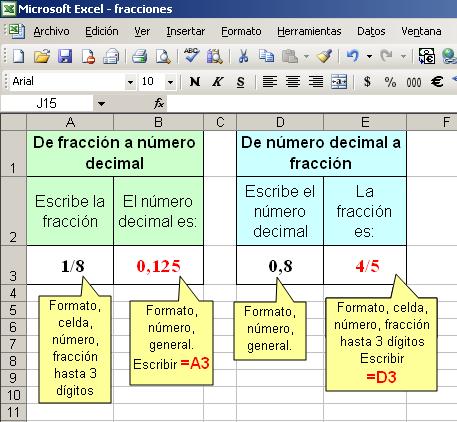
The following table makes a fraction of the number and also a number to a fraction.
is very easy to do, you just have to format the cells, you select each one and then have to go to Format , cell and Number . Then choose the options for each cell shown in the following image and acceptance.